Moving to Japan for a long-term stay—whether you are a digital nomad, an international student, a Working Holiday visa holder, or an English teacher—presents an immediate, frustrating challenge: getting a reliable mobile data connection.
If you are staying for a year or more, relying on pocket Wi-Fi rentals or tourist eSIMs is an absolute money pit. They are heavily overpriced and come with strict daily data caps. On the other hand, walking into a physical storefront of Japan’s traditional “Big 3” legacy carriers (Docomo, au, SoftBank) often results in an exhausting two-hour ordeal filled with complex Japanese paperwork, forced premium add-ons, and brutal cancellation fees if you decide to leave Japan before a strict two-year contract ends.
Fortunately, there is a much smarter, modern alternative that locals actually use: Rakuten Mobile. It offers completely unlimited data for just ¥3,278 per month (roughly $20 USD), and it has no long-term commitment.
While Rakuten Mobile provides an English version of its application page, the signup process can still get confusing fast due to unique Japanese address formatting and strict identity verification rules. As a local, I have put together this ultimate, honest guide to walk you through exactly why it’s worth your money, the real downsides you need to know, and a step-by-step tutorial on how to sign up completely online in English.
- I’m Personally a Rakuten Mobile User—Here’s Why
- Why Rakuten Mobile is the Best Choice for Long-Term Expats
- The Honest Downsides: What You Need to Know Before Signing Up
- Pre-Requisites: What You Need to Prepare Before Applying
- Step-by-Step Guide: How to Apply Online in English
- Activation: How to Get Connected Instantly
- Conclusion
I’m Personally a Rakuten Mobile User—Here’s Why
Full disclosure: I don’t just recommend Rakuten Mobile—I actually use it as my personal daily driver.
As someone who values both time and budget, two specific things made it a complete no-brainer for me: the total convenience of a 100% online signup (no spending half a day waiting inside a crowded physical store with stacks of paperwork), and the unbeatable price for unlimited data.
Living and working in Tokyo, having a high-speed line where I never have to worry about data throttling or counting gigabytes—while keeping my monthly bill under $20—makes life incredibly smooth.
Why Rakuten Mobile is the Best Choice for Long-Term Expats
If you are staying in Japan long-term, Rakuten Mobile hits the absolute sweet spot for value and flexibility:
- True Unlimited Data for ~$20 USD: For just ¥3,278 (including tax) a month, you get unlimited high-speed data. This includes completely free tethering (mobile hotspot), meaning you can connect your laptop and work from anywhere without renting home internet.
- No Long-Term Contracts or Hidden Fees: There are no minimum contract lengths. If you finish your one-year exchange program or suddenly decide to move back home, you can cancel your line online at any time with ¥0 in cancellation fees.
- Free Calls to Your Home Country: By using the official, free Rakuten Link app, you get free domestic calls within Japan. Even better, it allows you to make free international voice calls back to your home country (covering a massive list of countries, including the US, UK, Canada, and Australia) as long as you are connected to the app.
- Earn Rakuten Points automatically: Your monthly phone bill automatically generates Rakuten Points. You can use these points like real cash to buy groceries at local convenience stores, shop on Rakuten Ichiba, or seamlessly pay off your next month’s phone bill.
Exclusive Hidden Bonus: Get Up to 14,000 Yen in Points
Before you sign up, you need to know about a special, insider loop called the “Rakuten Employee Referral Campaign” (often known as the Mikitani Campaign).
Access Rakuten Mobile Campaign- Switching from another carrier (MNP Transfer): You get 14,000 Rakuten Points (worth ¥14,000 / ~$90 USD).
- Getting a brand-new phone number: You get 11,000 Rakuten Points (worth ¥11,000 / ~$70 USD).
The best part? Even if you used to have Rakuten Mobile in the past and cancelled it, returning users (re-applicants) are still 100% eligible for this bonus, which is unheard of in Japan.
(Note: To prevent instant cancellation fraud, these bonus points are not handed over all at once. They will be distributed to your account in installments over a 3-month period starting from the fourth month after your line is activated, which serves perfectly to cover your upcoming bills).
The Honest Downsides: What You Need to Know Before Signing Up
To give you the 100% honest truth, Rakuten Mobile is not completely perfect. Before you register, here are the real downsides you should consider, combined with my own personal experience as a daily user.
- Network Coverage in Subways & Concrete Buildings: While Rakuten has recently rolled out its “Platinum Band” frequencies to drastically close the gap with legacy carriers, its signal can still occasionally struggle in specific environments. You might notice dropped connections or slower speeds inside deep concrete basements, certain underground subway stations, or remote, deep mountain areas.
- My Experience: Personally, I don’t view this as a dealbreaker. I try to practice a bit of digital detox and avoid staring at my phone 24/7 anyway. I usually use my data in relaxed, open spaces, apartments, or cafes, so these brief underground drops rarely impact my actual daily life.
- Speeds During Peak Congestion Hours: During heavy bottleneck periods—like the 12:00 PM lunch rush or inside massive, packed transit hubs during Tokyo’s evening commute—data speeds can temporarily dip. Web pages or high-definition videos might take a few extra seconds to buffer.
- Voice Call Quality via Rakuten Link: Because the Rakuten Link app runs your calls over an internet-protocol (VoIP) system to make them free, the audio quality relies entirely on your data signal. If you are in a weak signal area, you might experience choppy audio or a slight voice delay. (If you rarely make traditional voice calls and mostly stick to WhatsApp, FaceTime, or Discord like me, you won’t notice this at all).
- The Tiered Data Pricing Structure: Rakuten automatically adjusts your bill at the end of the month based on exactly how much data you consumed. Here is the breakdown:
- 0 to 3 GB: ¥1,078 per month
- 3 GB to 20 GB: ¥2,178 per month
- Over 20 GB: ¥3,278 per month (Capped at this maximum price for Unlimited)
If your monthly usage always hovers around 4GB or 5GB, it might technically be slightly more expensive than some bare-bones, budget MVNO carrier SIMs. But the beauty of this system is that if you have a quiet month where you barely use data, your bill drops automatically—and if you travel around Japan and burn through 100GB, it caps safely at $20.
Pre-Requisites: What You Need to Prepare Before Applying
The number one reason foreigners get rejected during an online SIM application in Japan is incorrect documentation. Before you open the sign-up page, make sure you have these three items ready to go:
- A Valid Residence Card (在留カード – Zairyu Card): This is mandatory for long-term visa holders. Crucially, your current Japanese address must be officially printed on either the front or the back of the card. If you just landed in Japan, you must visit your local city hall (Ward Office) to register your address first before applying for the SIM.
- Your Physical Passport: Used as a secondary identification check alongside your Residence Card.
- A Payment Method: You can use an overseas-issued credit card (Visa, Mastercard, AMEX, etc.), a Japanese credit card, or set up a direct bank transfer (口座振替) if you have already opened a local Japanese bank account.
- An Unlocked Smartphone: Ensure your phone is completely carrier-unlocked and supports eSIM if you want instant, same-day activation.
Step-by-Step Guide: How to Apply Online in English
Now that you have your documents ready, follow this exact sequence to ensure your application gets approved smoothly on the first try.
Step 1: Secure Your VIP Referral Bonus
Click the special employee referral banner/link below to enter the Rakuten VIP Campaign page.
Access Rakuten Mobile VIP Campaign👉 [Claim Your 14,000 Yen Bonus: Rakuten Official Employee Referral Portal]
(Note: You must log in with your Rakuten ID on this special page before finalizing your application to lock in your 14,000 or 11,000-point bonus. If you don’t have a Rakuten ID yet, you can create one in 60 seconds on the spot for free)
⚠️ CRITICAL WARNING: During the identity verification process, the website might prompt you to download the “my Rakuten Mobile” app. Do NOT complete your actual application inside the app. If you apply through the app, the system will void your employee referral cookie, and you will lose your bonus points. If you download the app for identity verification, please immediately return to your web browser to finalize and complete your application.
Step 2: Select the “Rakuten Saikyo Plan”
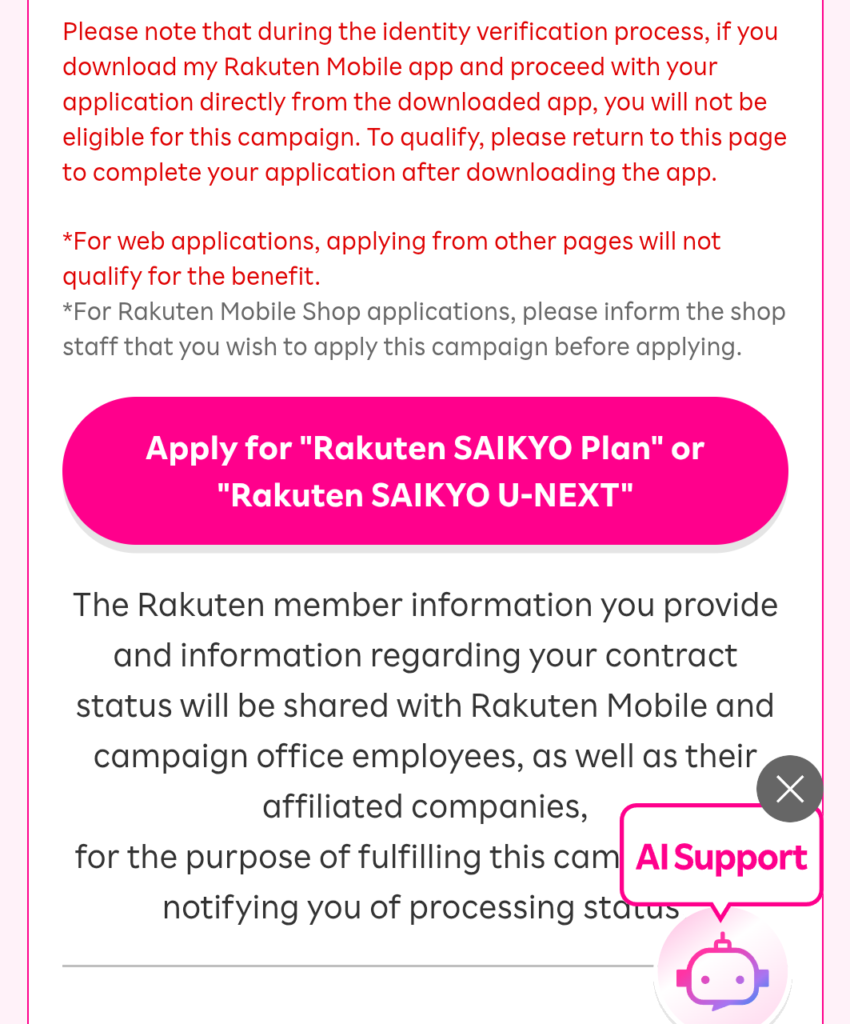
Rakuten keeps things incredibly simple by offering only one single plan—the Rakuten Saikyo Plan. Select this option.
⚠️ Watch Out for the Option Trap: The system will automatically try to upsell you on optional add-ons, such as international calling packs or phone insurance.
Make sure to uncheck all of these options to keep your monthly bill strictly limited to your actual data usage.
Step 3: Choose Your SIM Type (eSIM vs. Physical SIM)
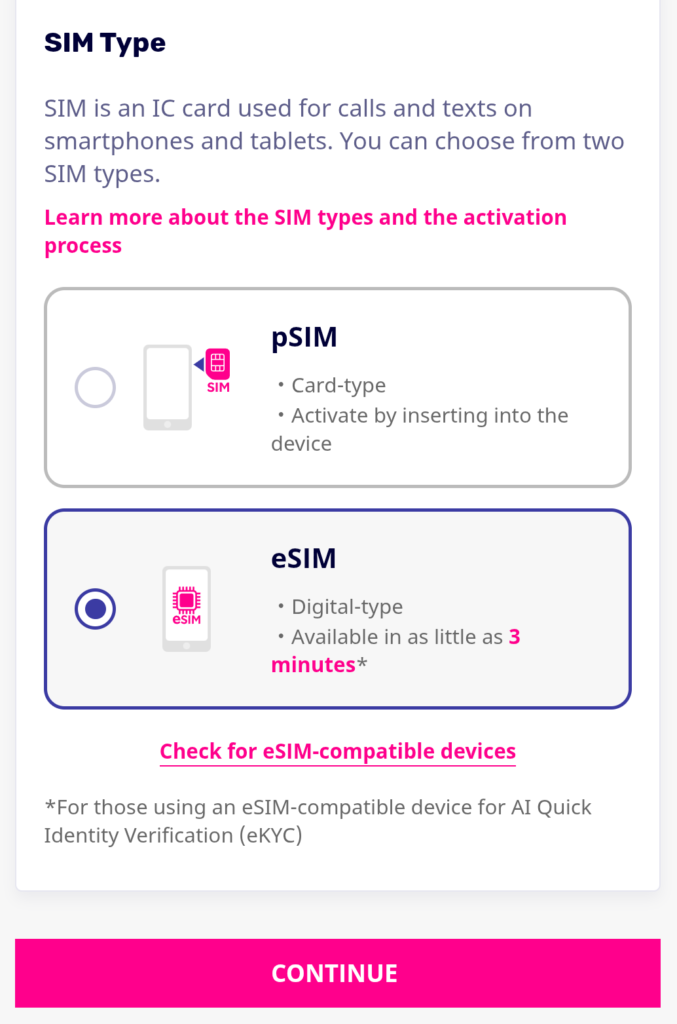
- eSIM (Highly Recommended): If your smartphone is compatible, select eSIM. Your identity will be verified digitally, and your line can be fully activated within a few hours without waiting for mail delivery.
- Physical SIM: If your phone does not support eSIM, select the physical nano-SIM. Rakuten will ship a physical card to your registered Japanese address within 2 to 3 business days.
Step 4: Upload Your Identity Verification Documents
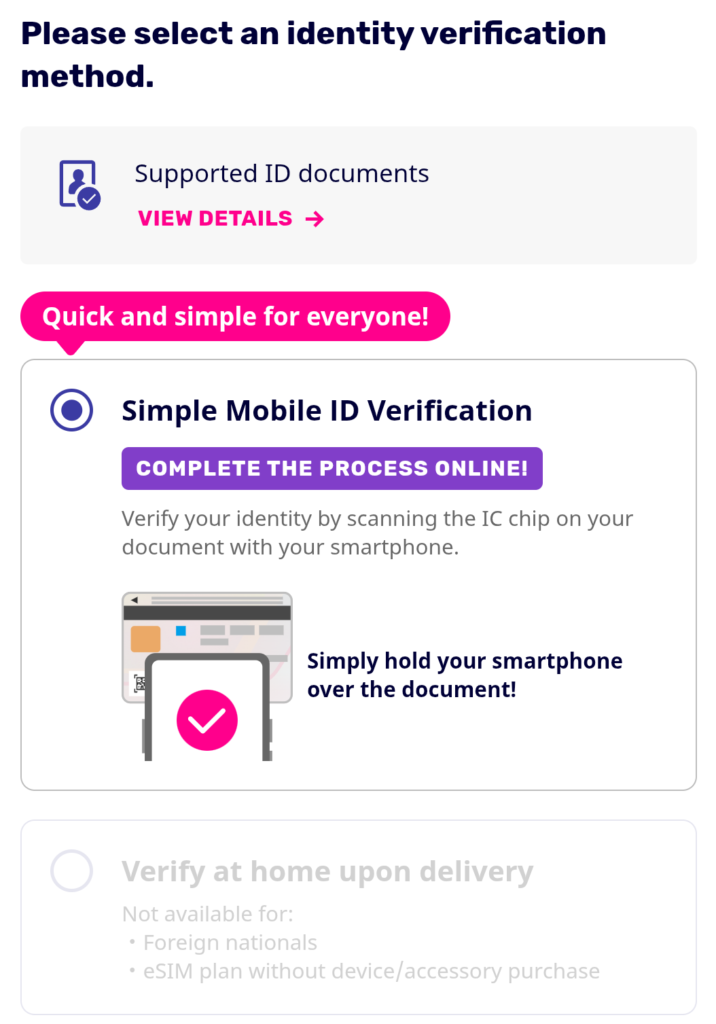
You will be prompted to upload clear, glare-free photos of your Residence Card and your Passport. Ensure that the name and address you type into the text boxes match the spelling and characters on your physical cards letter-for-letter. If your middle name is on your passport, include it exactly as it appears.
Step 5: Master the Japanese Address Format (The Hardest Part)
*If you have already created a Rakuten ID and registered your personal information, the information you have already registered will be displayed automatically.
This is where most expats fail. The English site will still require you to input your Japanese address properly. Japanese addresses flow from largest to smallest unit:
- Postal Code (郵便番号): Enter your 7-digit code (e.g., 100-0001) to automatically populate your Prefecture and City.
- Prefecture & City: (e.g., Tokyo-to, Shinjuku-ku)
- Chome, Banchi, Go (町名・番地): This is the street number combo (e.g., 3-24-1). Input these numbers exactly as they are printed on the back of your Residence Card.
- Building Name & Apartment Number (建物名・部屋番号): Do not forget to include your apartment number (e.g., Mansion Sakura Room 302). If this is missing, the courier cannot legally deliver a physical SIM card, or your identity verification will fail.
Step 6: Complete the Payment & Submit
Input your credit card or bank transfer details. Review your final summary sheet to confirm there are no accidental premium add-on checkboxes selected, and click Submit.
Activation: How to Get Connected Instantly
Once your application is officially approved via email, getting online takes just a few final steps:
- Download the “my Rakuten Mobile” App: Available on both the Apple App Store and Google Play Store. Log in using the Rakuten ID credentials you created during signup.
- Install the eSIM Profile: If you selected eSIM, simply click “Activate eSIM” inside the app. Your phone will prompt you to download a cellular profile. Follow the on-screen steps, and toggle the line on.
- Configure APN Settings:
- iPhone: Your network settings will configure automatically. If prompted with a “Carrier Settings Update,” click Update.
- Android: If data doesn’t work instantly, navigate to Settings > Mobile Networks > Access Point Names (APN) and add a new APN with the name
rakuten.jpto get connected to the network tower.
- Download the “Rakuten Link” App: Download this secondary app immediately and complete the SMS verification. Remember to route all your standard outbound phone calls through this app to ensure they remain 100% free of charge.
🚨 THE BONUS LOCK CONDITION: To officially trigger and receive your 14,000 or 11,000 referral points, you must make at least one domestic phone call lasting 10 seconds or longer via the Rakuten Link app within the next month after your line is opened. You can simply call a friend or any local business number—just ensure the call stays connected for at least 10 seconds to lock in your free points!
Apple App Store / Google Play Store
Conclusion
You do not need to fall victim to confusing local mobile phone pricing, steep legacy carrier contracts, or weak, overpriced travel data packages during your long-term chapter in Japan. By opting for Rakuten Mobile, you secure completely unthrottled, worry-free unlimited data for the price of a couple of bowls of ramen a month.
Ready to get your Japanese phone number and unlimited data set up today? Use the link below to launch your application directly in English and hit the ground running!
👉 [Click Here to Sign Up for Rakuten Mobile (Official English Portal)]
Comments